
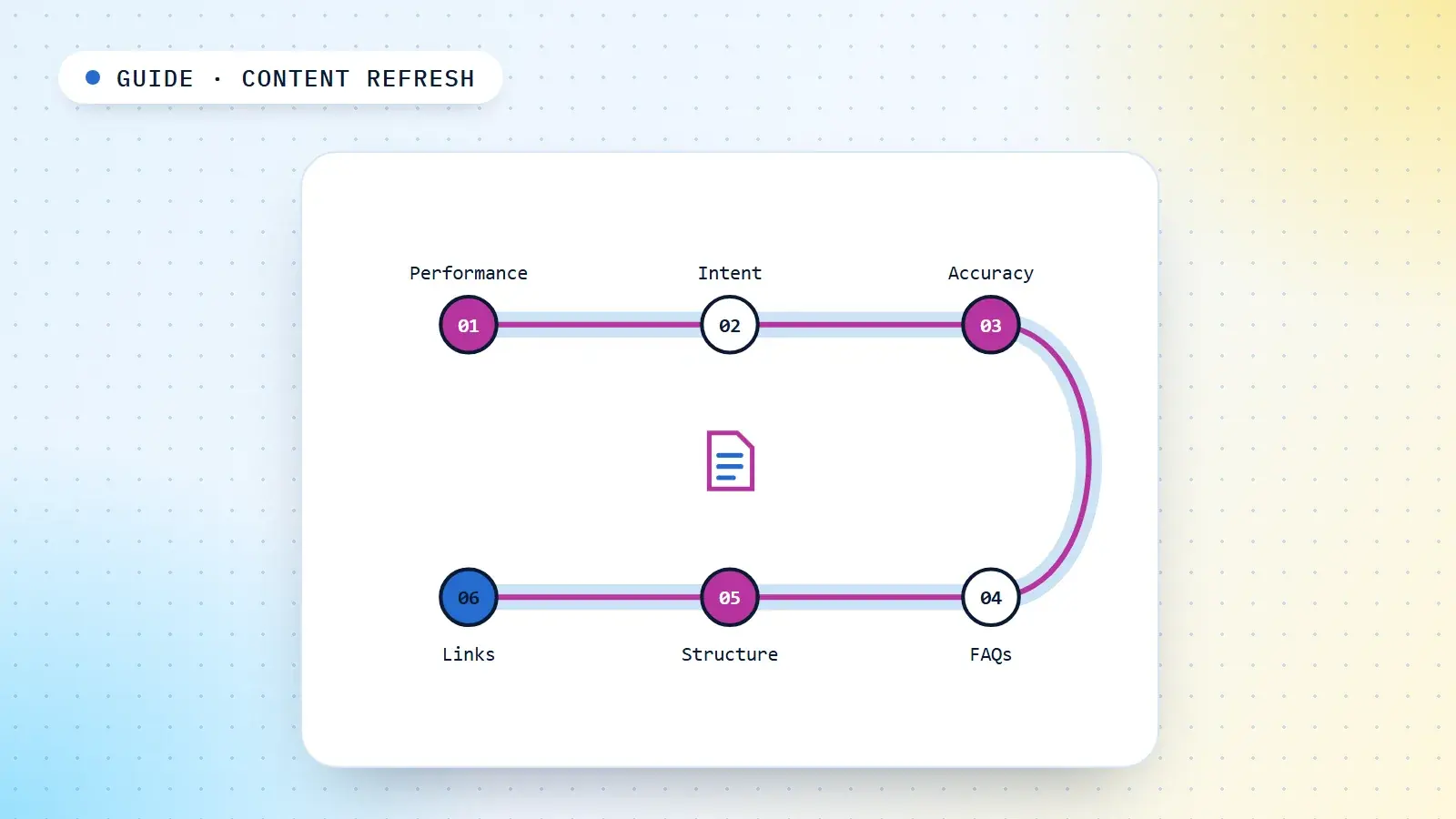
One thing I recommend before investing heavily in new content is going back to what you have already published. Many websites have hundreds of articles, FAQs, service pages and informational resources, and a large share of it was written years ago and has rarely been reviewed since.
Meanwhile, almost everything around that content moves. Search intent changes. Industry practices evolve. Products and services get updated. Search results become more competitive. New questions emerge and old information becomes less relevant. Yet many sites keep publishing new articles without revisiting the old ones, which creates a content maintenance problem nobody planned for.
So instead of always asking "What should we publish next?", ask a second question: "What can we improve in the content we already have?" This guide is the practical answer: how to decide which pages to update, what to change on each one, and how to turn it into a routine. Deciding which pages a site needs in the first place belongs to content SEO; the case for fixing before publishing more is in does publishing more content help SEO?
Decide what to update with performance data
Do not prioritise articles on publication date alone. Use Google Search Console and your analytics to find the pages that deserve attention, and read each signal for what it points to:
| Performance signal | What to investigate |
|---|---|
| Declining clicks | Changes in rankings, demand or search intent |
| High impressions, low CTR | Title, description and how the page appears in the results |
| Average position between 5 and 20 | Content relevance and ranking opportunities |
| Declining impressions | Search demand, competition or relevance |
| Traffic but low conversions | Intent mismatch and conversion paths |
| Good rankings but outdated information | Accuracy and content maintenance |
| No organic traffic | Indexing, targeting, quality and demand |
Compare like-for-like periods, year on year where seasonality matters. What each of these metrics measures, and where it misleads, is covered in the SEO metrics guide.
A page with zero traffic is not automatically useless. It may support another page, serve existing customers, or cover a valuable topic that has not yet gained visibility. Work out the page's purpose before deciding whether to update, consolidate, redirect or remove it.
Then sort the candidates with a simple priority score:
- High priority: important pages losing organic visibility, outdated commercial information, or inaccurate content.
- Medium priority: articles with impressions but weak CTR, outdated sections, or missing relevant internal links.
- Low priority: evergreen articles that are still accurate and still satisfy their search intent.
1. Recheck search intent before rewriting
This step matters most. An article written three years ago may have targeted its keyword correctly at the time, but the results page and what searchers expect may have changed since.
Someone searching for "best SEO tools" may now expect a comparison of the available tools, pricing, features and limitations, recommendations for different use cases, and current screenshots or product information. An old article that is only a list of tool names may no longer satisfy that intent.
Before rewriting, search the article's primary keyword and study the current results:
- What type of pages are ranking?
- Are the results informational, commercial or transactional?
- What topics do the competing pages cover?
- Which questions appear repeatedly?
- Do searchers expect comparisons, tutorials, lists or detailed explanations?
- Has the intent shifted since the article was first published?
Do not copy competitors. Use the results to understand expectations and to find the chance to be more useful. The search intent guide covers how to read a results page in detail.
2. Update the old article instead of creating a duplicate
Before writing a new article for a keyword, check whether you already have a page on the same subject. If the site already has "How to Improve Website Speed" and you are about to publish "10 Ways to Make Your Website Load Faster", the two overlap substantially. Publishing the second without reviewing the first can create keyword cannibalisation or plain duplication.
Evaluate the existing article first:
- Does it already target the same search intent?
- Can it be expanded with genuinely useful information?
- Does it contain outdated recommendations?
- Can missing subtopics be added?
- Does it need better examples or practical instructions?
- Would a separate article serve a genuinely different intent?
If the existing URL is right for the job, updating it is usually better than creating a competing page. Create a new article only when there is a meaningful difference in topic, audience or intent. A keyword map is how you keep track of which URL owns which intent.
3. Update statistics, examples, screenshots and references
An article can go out of date even when its subject is still relevant. A piece about SEO tools, for example, may contain old pricing, discontinued features, outdated screenshots, old interface instructions, broken reference links, statistics from several years ago, or recommendations for tools that no longer exist.
Review each of these, and update information only when there is a reason to. Verify every new statistic and cite its original source where possible.
4. Rework old FAQs around current questions
FAQs are often neglected after publication. A section written three or four years ago may no longer reflect what people actually want to know.
An old article about website development might answer: What is website development? Why do businesses need a website? How much does website development cost? Those may still be relevant, but they miss newer concerns such as:
- How much does website maintenance cost?
- What should be included in a website development contract?
- How long does a business website take to develop?
- Is WordPress suitable for a growing business?
- What should businesses check before hiring a web development agency?
The point is not to add every possible question. Review the existing FAQs and find the gaps using:
- Google Search Console queries.
- Google's People Also Ask results.
- Related searches.
- Customer support and sales questions.
- Keyword research tools.
- Relevant discussions in industry communities.
5. Improve structure and readability
Older articles were sometimes written without a clear structure. When you review one, check:
- Does the introduction answer the reader's main question?
- Are the headings logically organised?
- Are the important explanations easy to find?
- Are paragraphs unnecessarily long?
- Are the examples still relevant?
- Do any sections repeat the same information?
- Are the recommendations actionable?
- Does the conclusion give a useful next step?
You do not need to increase the word count; Google states plainly that it has no preferred word count. Sometimes removing outdated or repetitive information makes an article significantly better. The goal is usefulness, not length. Element-by-element advice on titles, headings and openings is in the on-page SEO guide.
6. Rework internal links every time you update
This is where refreshing content and internal linking should work together. Do not update an old article without checking its links, both outgoing and incoming.
If you are updating an article about technical SEO, check whether it should link to website architecture, internal linking, XML sitemap optimisation, robots.txt, canonical tags, crawl budget optimisation and indexation troubleshooting. Then check whether other existing articles should link back to the updated page. Updating one article often reveals linking opportunities across several others.
My recommendation: treat every content update as a chance to improve the site's overall content architecture, not just the individual article. The patterns I see when this is skipped are described in the internal linking problems we keep finding.
Make it a six-month routine
I recommend treating this as a recurring SEO activity rather than an occasional clean-up: a content round-up every six months. You do not need to rewrite every article; the aim is to find the pages that need attention and prioritise them by SEO and business value. In each review, look at:
- Articles published more than six months ago.
- Articles not updated in over a year.
- Pages losing organic clicks or impressions.
- Articles ranking for keywords that no longer match their original intent.
- Pages with outdated facts, statistics, screenshots or recommendations.
- Articles no longer aligned with your current products or services.
- Pages that could benefit from better internal linking.
A practical cycle:
| Activity | What to do |
|---|---|
| Content inventory | Export all published URLs |
| Performance review | Check clicks, impressions, CTR and rankings |
| Search intent review | Compare existing content with current search results |
| Content accuracy | Verify facts, examples, pricing and references |
| Internal linking | Review incoming and outgoing contextual links |
| Cannibalisation review | Identify overlapping pages |
| Content improvement | Rewrite, expand, consolidate or maintain |
| Measurement | Record changes and monitor performance |
Content refresh checklist
Use this whenever your team revisits an existing article:
- Check the page's current organic performance.
- Review its primary keyword and search intent.
- Examine the current search results.
- Verify facts, statistics and references.
- Update outdated screenshots and examples.
- Review old FAQs and add relevant missing questions.
- Remove redundant or inaccurate information.
- Improve headings and content organisation.
- Identify relevant internal linking opportunities.
- Check incoming internal links from other articles.
- Review overlapping pages and potential cannibalisation.
- Verify that all important links work.
- Check the title, meta description and canonical URL.
- Record the changes made.
- Monitor performance after updating.
Final recommendation
Before publishing another 50 articles, look at the 200 you have already published. Some will need better answers, some updated information, some better alignment with search intent, and others simply proper internal linking.
Content production should not be a one-way process. Publishing is only one part of content management; reviewing, improving, connecting and maintaining what exists matter just as much.
My recommendation is simple: run a complete content review every six months, prioritise pages on actual performance and relevance, and make internal linking part of every content refresh. Do not let older content become an abandoned collection of URLs. Keep it useful, accurate, connected and aligned with what people are searching for today.
Sources
- Google Search Central: Creating helpful, reliable, people-first content (the questions on changing dates to seem fresh and on word count).
- Google Search Console Help: Performance report (Search results) (clicks, impressions, CTR and average position).
Frequently asked questions
How often should you update old content?
A full content review every six months works well as an editorial habit, with immediate updates whenever important information changes. It is not a Google requirement: fast-moving topics need more frequent updates, and evergreen pages can stay accurate for much longer.
Should I change the publication date when I update an article?
Only when the content has genuinely changed. Google's helpful content guidance specifically asks whether you are changing dates to make pages seem fresh when the content has not substantially changed. Update the date to reflect real changes, not as a tactic.
Is it better to update an old article or write a new one?
If an existing page already targets the same search intent, updating it is usually better than publishing a competing page, which can cause cannibalisation. Write a new article only when the topic, audience or intent is meaningfully different.
Which pages should I refresh first?
Prioritise by performance and importance, not age: important pages losing visibility, outdated commercial information and inaccurate content first; pages with impressions but weak CTR or missing internal links next; accurate evergreen pages last.
Does refreshing content mean making it longer?
No. Google has said it has no preferred word count. Removing outdated or repetitive information often improves an article more than adding to it. The aim is a more useful page, not a longer one.